Free vs Pro

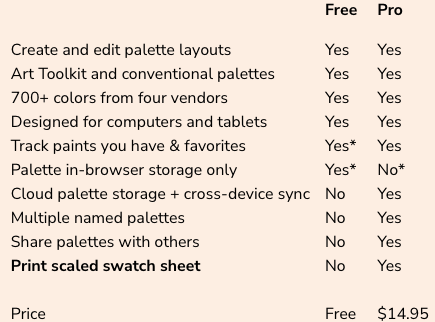
Both editions include EasySwatch’s complete visual palette-planning workspace. Free is ideal for temporarily building and refining one current palette. Pro is for painters who want to keep multiple named palettes, work across devices, back up their data, and print actual-size references.

Without Pro your data is just stored in your browser’s local memory. It won’t be shared across multiple devices and it can be lost if your browser’s history is cleared. But, hey, it’s free!

Pro uses Dropbox, even their free basic account, to store your palettes, favorites, and changes to your master paint file. Using Dropbox’s special developer features helps us keep costs low and keeps you in control of your data. Don’t worry, we don’t have access to anything in your Dropbox other than our directory in the App folder. You don’t even have to download Dropbox if you don’t want to, we can just pull the information from the cloud.

Create and edit palette layouts
Art Toolkit and conventional palettes
600+ colors from the big 3 vendors
Designed for computers and tablets
Track paints you have & favorites
Palette in-browser storage only
Dropbox storage + cross-device sync
Multiple named palettes (in Dropbox)
Palette and Paint import/export
Print scaled swatch sheet

Price

Free

Yes
Yes
Yes
Yes
Yes*
Yes*
No
No
No
No

Free

Pro

Yes
Yes
Yes
Yes
Yes
No*
Yes
Yes
Yes
Yes

$9.95 Introductory one time price.

* The EasySwatch free version just stores a single palette, favorites, and edits to your master paint file in your browser’s storage. That will disappear if browser’s history is cleared. That information also doesn’t sync between devices. The Pro version stores and syncs all your EasySwatch data far more securely in Dropbox (even their free “Basic” version.) The free version of EasySwatch is great for brainstorming a palette idea but shouldn’t be used for things you’d be sad to lose.